With the rise of AI, people are increasingly turning to ChatGPT and other large language models (LLMs) to get recommendations and find answers. And honestly, these tools are doing a remarkable job at it.
They’ve made information discovery significantly easier. What used to require jumping from website to website on Google has now been simplified into a single step — you type a prompt and get a direct, to-the-point answer. The AI has already done the heavy lifting: verifying sources, filtering out the fluff, and delivering exactly what you need.
The same shift is happening with navigational queries. When someone searches for the “best ABC service provider,” ChatGPT responds with 5–6 brands it already considers credible and trustworthy. If you want your brand to be one of them, I’ve written a detailed blog explaining exactly how to make that happen. You can read the full blog on how to get your brand mentioned by ChatGPT.
But here’s the problem: ChatGPT is not a search engine. There’s no webmaster tool or search console where brands can get indexed. There’s no built-in way to track ChatGPT brand mentions or see which prompts are triggering your brand across AI tools. You simply can’t log in somewhere and check your brand visibility in ChatGPT the way you would in Google Search Console.
This has left a lot of brand owners in the dark. Everyone is asking the same questions: How do I monitor brand mentions in ChatGPT? How can I see where and how my brand is showing up? How can I track my brand’s success in ChatGPT? Unfortunately, no dedicated solution exists for this yet.
Some SEO platforms are attempting to fill this gap with tools to monitor ChatGPT brand mentions, but frankly, I’m not very impressed with what they currently offer. Many of the prompts they track aren’t relevant, and some don’t even make logical sense on their own. If you’re looking for the best tool to track brand mentions on ChatGPT, the honest answer right now is that nothing available does it with full accuracy.
For example, my company offers website development, website maintenance, SEO Services, and digital marketing services. We rank well on many related keywords and do get mentioned by ChatGPT. When I checked our brand mentions in ChatGPT using SEMrush, it showed an AI visibility score of 24.
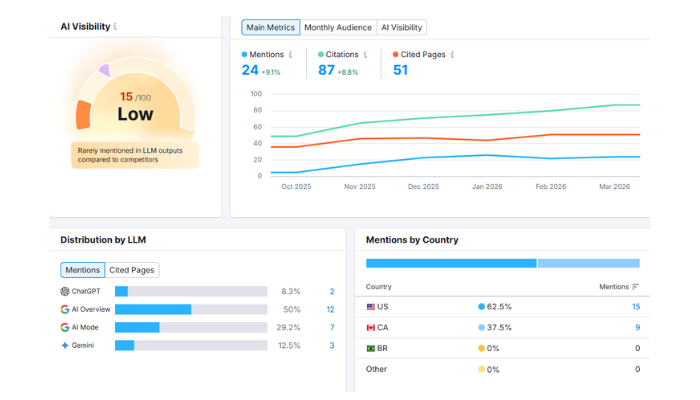
But when I actually looked at the prompts behind that score, I was speechless.
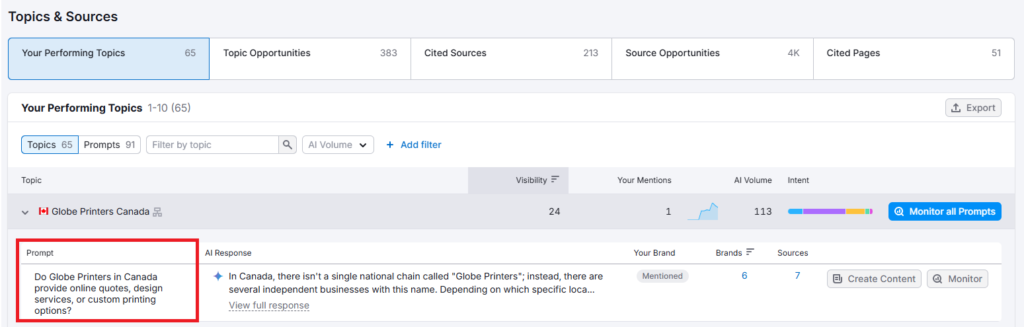
One of them was about printers and printing, something my company has absolutely nothing to do with. Yet there we were, apparently being mentioned in that context.
What makes it even more frustrating is that we are appearing for many of our actual target keywords, the ones we’ve intentionally worked to rank for. But SEMrush didn’t pick up any of those. It missed the mentions that actually matter to us, while surfacing completely irrelevant ones.
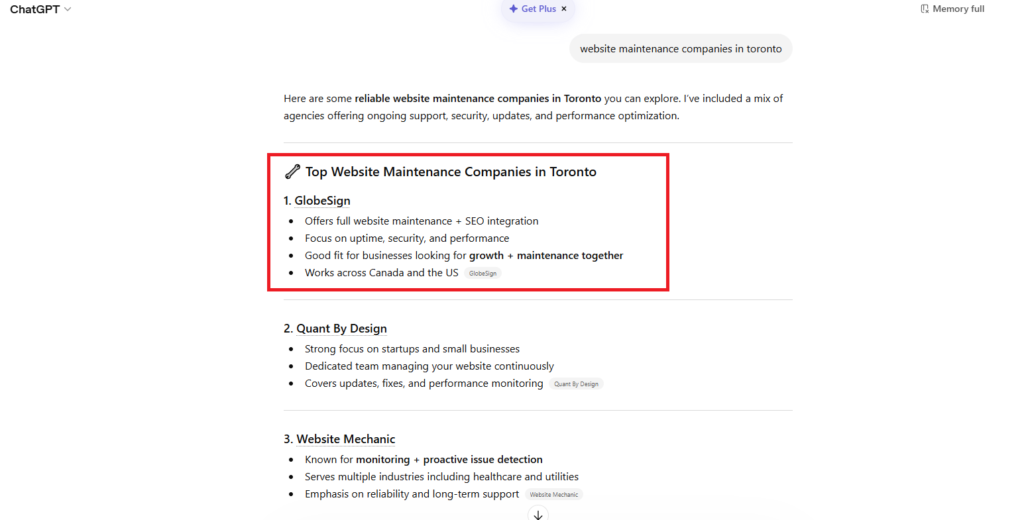
The main reason is simple: these tools are still new and need time to mature and improve their accuracy.
So the question remains: how do you actually track your brand mentions on ChatGPT?
When I was putting together my own AI Optimization checklist, this exact question was on my mind. I knew I couldn’t rely on tools that were giving me inaccurate or irrelevant data. So I figured out my own way to do it.
And the good news? It’s really simple. No complex setup, no expensive software, and the chances of getting irrelevant results are very low.
Here’s my step-by-step guide to monitoring your brand mentions in ChatGPT:
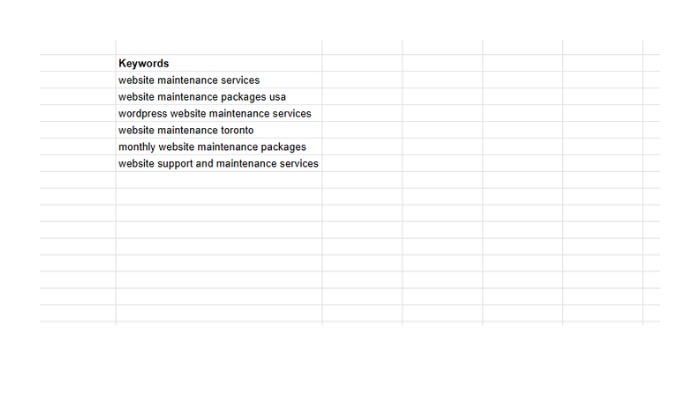
Step 1: Prepare Your Target Keywords List
Start by pulling together a list of your target keywords. If you’re already doing SEO, you likely have these on hand. They could be keywords you’re currently ranking for on Google, or simply the ones you consider most important for your business.
Once you have them, set up a simple Excel sheet or Google Sheet organized like this:
Step 2: Prepare the Prompt
Copy the prompt below, replace your keyword, and run in ChatGPT.
——————————————————————————–Promt Starts Here ———————————————–
You are an AI system that generates natural-language search queries that real users would ask AI models or search engines when looking for brands, providers, or companies — not definitions or informational content.
When I provide a PRIMARY KEYWORD and optional SECONDARY KEYWORDS, generate up to 10 highly relevant, full-sentence questions that are designed to trigger branded or provider-based answers (ex, lists of companies, top providers, best service options).
RESPONSE RULES:
- Output ONLY the queries
- One per line
- No numbering, no bullets, no explanations, no headings
- Lowercase preferred
- No punctuation at the end
- Maximum 10 queries total
- All queries must be phrased as natural questions, the way users speak to AI tools like ChatGPT, Perplexity, Gemini, or voice assistants
QUERY TYPE REQUIREMENTS:
- One exact-match commercial query about the primary keyword
- One or two synonym-based provider lookup questions
- One affordability-based or “best/top” commercial intent variation
- One geo/location targeted query (city, near me, GTA, province, country)
- One long-tail variation combining a secondary keyword
- One freshness/timed query (ex: updated, 2025, latest)
- One broader region variation (ex: GTA, Ontario, Canada)
- One platform/niche variation if applicable (ex: wordpress, e-commerce, shopify)
- ALL queries must imply a list or recommendation of companies (brand-retrieval intent)
- No informational queries (ex: “what is website maintenance” is NOT allowed)
Do NOT include:
- Meta titles, descriptions, or paragraph content
- Headings, labels, or commentary
- Definition, how-to, or educational queries
- Queries that would return blog posts instead of business lists
Here is my input:
Primary Keyword: [ ENTER YOUR KEYWORD HERE ]”
——————————————————————————–Promt End Here ————————————————–
As you can see, the prompt is specially designed to mix and match each keyword with every possible way a person might search for it. One variation targets price, another focuses on reliability, one pulls in recent data, and another covers long-tail search patterns.
This way, you’re not just checking one generic prompt. You’re covering the full range of how real users might ask ChatGPT about your product or service category. This dramatically increases the chances of catching every relevant mention of your brand.
Step 3: Get your Key Prompts
Once your prompt is ready, enter it into ChatGPT. It will generate 10+ highly relevant search variations for your keyword, each one reflecting a different situation or intent a real person might have when searching.
This is important because neither you nor any tool like SEMrush can realistically think of every possible way someone might search for your product or service. ChatGPT, however, is trained on massive amounts of real human search behavior, making it far better at generating these variations naturally and comprehensively.
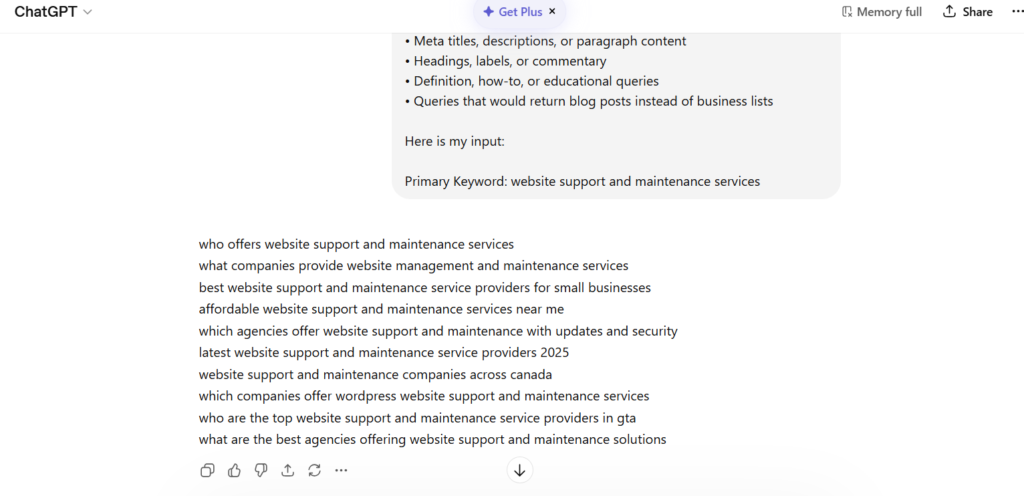
And unlike Google, there’s no dashboard showing you which exact prompts your brand is appearing for. So in my opinion, this is the best method available right now — yes, it’s a bit lengthy, but if accuracy is what you’re after, I’d bet on this approach over anything else.
Here’s how it scales: against each keyword, ChatGPT returns 10+ prompt variations. For example, I started with just 6 main keywords and ended up with 61 unique prompts using this method.
Once you have them all, record them against their respective keywords in your sheet like this:
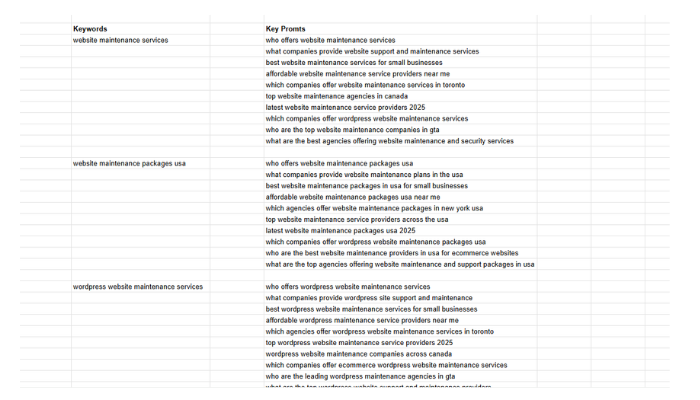
Now this is the most valuable data you’ll collect through this entire process.
Take each of these prompts and search them one by one in ChatGPT, then carefully record the responses.
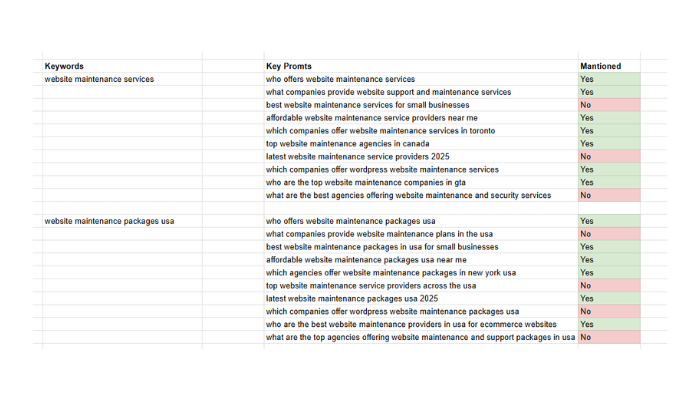
This is the method I rely on, and it’s the most accurate one I’ve found so far. I use the same process for my clients as well. At the end of every month, we run through it again, much like how we used to do keyword rank tracking in the early days of SEO.
By simply comparing the results month over month, we can clearly track how our AI Optimization (AIO) performance is improving over time. It’s straightforward, reliable, and gives you real data you can actually act on.